For individuals
Apply for your role at events
Organizer, host, guide and more: see the date, place, shift and daily pay before you apply, and follow your request and what you are owed from your phone.
-
 Coming soon
-
 Coming soon


Start with your account
-
Sign up once
Your mobile number is verified by a one-time code, then you add your personal, education, professional, health and bank details.
-
Your documents are reviewed
Upload your ID, certificates and CV. Wafy’s team reviews them and you are notified of the result.
-
Sign your contract in the app
Your contract with Wafy is signed electronically. You can return to it and download a PDF copy whenever you like.
Choose your role and apply
-
Browse events
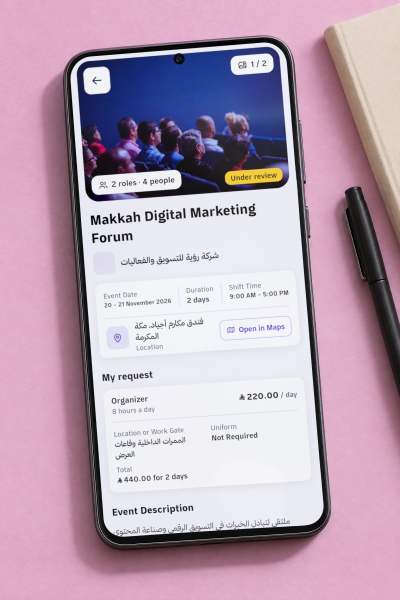
Every event with its dates, its place on the map and the roles it needs.
-
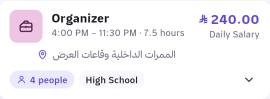
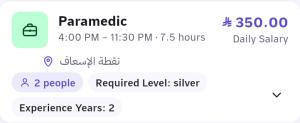
Know the details before you apply
The shift, the hours, the daily pay and the requirements, for every role.
-
Apply and follow your request
Apply for roles at your level and see your request’s status: under review, accepted or rejected.
Event day
-
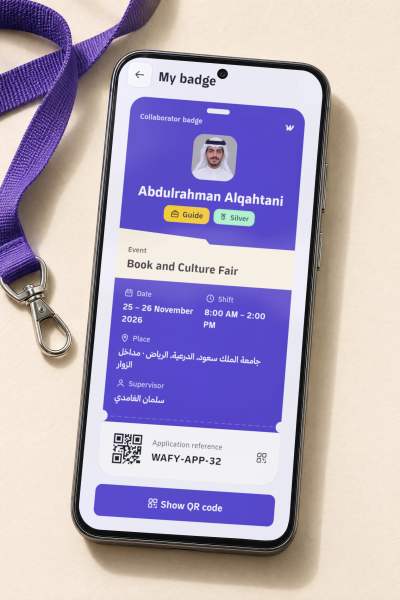
Your badge with a QR code
Once you are accepted, your collaborator badge shows your name, role, shift and the event’s place, with a QR code that carries your application reference.
-
The team chat
The supervisor opens it for accepted collaborators, and the day’s instructions reach you as text or voice.
-
You know your supervisor
The supervisor’s name and mobile number show once your request is accepted.

After the event
-
Your attendance and rating
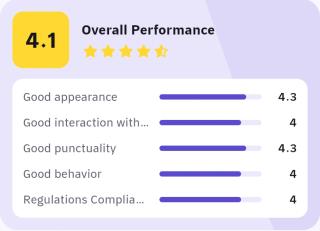
The supervisor records your attendance once. The company rates you, and you rate the company.
-
Your level goes up
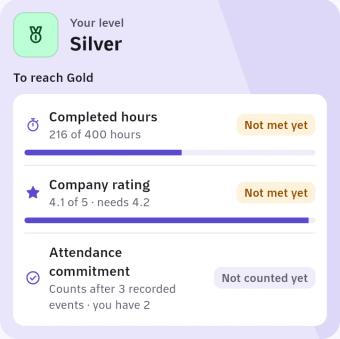
Bronze from day one, then silver and gold with your hours, your rating and your commitment. Each level opens more roles.
-
What you are owed, with its receipt
Your days and hours are counted for every event. The app shows when you have been paid, with the receipt, and your account statement as a PDF.
Questions from individuals
Email support Do I need experience to apply?
Each role has its own requirements, set by the company, and some roles are open to every level. You start at the bronze level from day one.
How do I get paid?
Wafy transfers what you are owed through STC Bank to your registered mobile number, after the event ends and Wafy receives its amount from the company. The app shows the status of each payout and its receipt.
When does my badge appear?
Once the company accepts your request. You open it from your accepted event, and on the event’s days it is on your home screen.
How do I reach silver or gold?
Three things count: your completed hours, the companies’ average rating of you, and your attendance commitment. The «How to upgrade» page in the app shows where you stand on each.
Who sees my data?
A company sees the data of people who apply to its events, only to assess their request and run the event. The full details are in the privacy policy.
Is Wafy available on mobile?
The iPhone and Android apps are coming soon to the App Store and Google Play. Until then you can use Wafy in your phone’s browser at app.wafione.sa.
Your next role starts here
Sign up in the browser now. The mobile app is on its way.
- Coming soon
- Coming soon